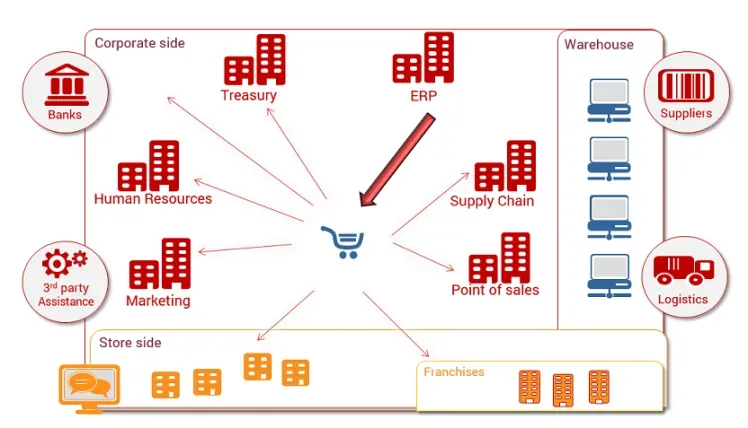
Mr. Entrepreneur bought a building. Now what??
Building the Complete Business Infrastructure for a New Brick-and-Mortar Store
From first wire to first sale—how to design a modern, automated operation
Launching a new retail store today isn’t just about location and product mix. It’s about systems—the invisible framework that connects your sales, inventory, accounting, and customer experience into one continuous flow of data. A strong infrastructure turns a sole proprietorship into a real operation.
Below is a full-stack view of how to plan, build, and automate your business systems from day one.
1. Foundation: Define the Operating Environment
Before picking tools, document what the business must do:
Core functions: sales, purchasing, accounting, fulfillment, and customer service
Transaction types: in-store, online, delivery, wholesale, or mixed
Volume expectations: daily tickets, SKU count, concurrent users
Compliance needs: taxes, PCI, health or labeling requirements
From there, decide your deployment model:
Cloud-based POS/ERP (Square, Lightspeed, Shopify, or Odoo Online) — minimal hardware, fast setup.
Hybrid local + cloud (Vend, ERPNext, or a custom SQL back end) — more control and offline continuity.
A single-user proprietor usually benefits from cloud systems first, migrating to hybrid as staff or complexity grows.
2. Hardware Layer
A stable hardware stack avoids downtime and data loss.
Essential components:
POS terminal or tablet (iPad, Android, or all-in-one register)
Receipt / label printer (Epson TM series or Star Micronics)
Barcode scanner (Honeywell or Zebra, 2D compatible)
Router with VLAN support for secure device isolation
Optional scale or weight interface (for groceries or delis)
Networked storage or secure cloud backup
Tip: Separate your POS network from guest Wi-Fi and IoT devices; use VLAN tagging or dual SSIDs.
3. Software Stack
Your software must talk to each other from day one. Build it like an ecosystem, not a pile of apps.
Function Common Tools Notes POS & Inventory Square, Lightspeed, Shopify POS, Odoo Syncs SKUs, pricing, and sales reports Accounting QuickBooks, Xero, Wave Should integrate via API or connector CRM / Marketing HubSpot, GoHighLevel, Zoho Capture customer data directly from POS Payments Stripe, Authorize.net, Square Payments Enable tokenized recurring billing Scheduling Calendly, Square Appointments Integrate with CRM and SMS HR / Payroll Gusto, QuickBooks Payroll Tie into sales hours and labor costs
Automation begins with integration—every platform must feed or receive data through an API, webhook, or connector (Zapier, Make, or native sync).
4. Data Architecture and Flow
Map the data before transactions start.
Example flow:
Sale at POS → Payment Processor → Accounting → Inventory Decrement → CRM Update → Marketing Trigger.
Each arrow should represent an automated task. Avoid manual exports; use middleware like:
Make.com for API-to-API mapping
n8n for on-premise or privacy-focused workflows
Zapier for prebuilt app connections
Add logging or webhook monitoring to detect sync errors early.
5. Automation Opportunities
Here’s where AI and automation pay off fast:
a. Inventory and Purchasing
Predictive reorder alerts using sales velocity (AI models via Google AutoML or simple regression in Sheets).
Barcode scanning workflows that auto-populate purchase orders.
b. Customer Service
AI phone or chat assistant (Twilio + ChatGPT API + CRM webhook) for after-hours calls.
Automated text follow-ups after purchase or missed calls.
c. Reporting and Forecasting
Real-time dashboards in Looker Studio or Power BI.
AI summarization of daily sales and anomalies delivered to email or Slack.
d. Accounting and Reconciliation
Rules-based categorization of expenses.
Automated receipt capture through OCR (QuickBooks or Hubdoc).
6. Security and Compliance
Use two-factor authentication everywhere.
Enforce least-privilege access for any hired staff.
Keep data encryption at rest and in transit (TLS 1.2+).
Schedule automatic backups of POS data and financials.
If processing cards, stay PCI-DSS compliant—most cloud POS handle this by default, but confirm in writing.
7. Implementation Timeline
Phase Duration Key Tasks Planning Week 1–2 Requirements, vendor shortlist, data flow diagram Procurement Week 3 Purchase hardware and licenses Configuration Week 4–5 POS setup, chart of accounts, tax tables Integration Week 6 Connect APIs, test syncs Automation Week 7–8 Add triggers, AI tools, reports Training & Go-Live Week 9 SOPs, dry runs, staff onboarding
Even as a sole proprietor, document every setup step—you’ll reuse it as you scale or hire.
8. Maintenance and Growth
Once live, monitor for:
Data drift: mismatched SKUs or pricing between systems
Latency: API or webhook delays during busy hours
Security posture: expired certificates or open ports
User experience: checkout friction or duplicate customer entries
Revisit integrations quarterly; automate what was manual last month.
Final Thought
A “complete business infrastructure” isn’t a one-time project—it’s a living network of systems that run quietly in the background so you can focus on sales and service. By combining reliable POS and ERP tools with automation and AI integrations, even a single-owner brick-and-mortar store can operate with the efficiency of a multi-location enterprise.

